February 2024
Release 12.5.1
Ability to Set Limits for Comp Authorizers
Stay is enhanced to allow users to define the limit for which comps can be redeemed for reservations by comp authorizers using an authorizer code in the property. The configured limit is applicable both to Admin Comp and Player Self Redeem Comp. Users can choose from the following options to define the limit:
-
Per Account
-
Per Day
-
Per Account Per Day
Users can configure limits both in the Comp Authorizers and Comp Departments tabs of the Comp Authorizers & Departments screen.
Configuring Limits in the Comp Authorizers Tab
Users can configure limits for comp authorizers in the Add/Edit Comp Authorizer screen in the Comp Authorizers tab of the Comp Authorizers & Departments screen (All Settings ➜ Comp Accounting Configuration ➜ Comp Authorizers and Departments). Users can configure limits by selecting the preferred option in the Authorizer Code section, department from the Select Department drop-down list, and define the amount in the text box that appears when the Comp Limit checkbox is enabled.
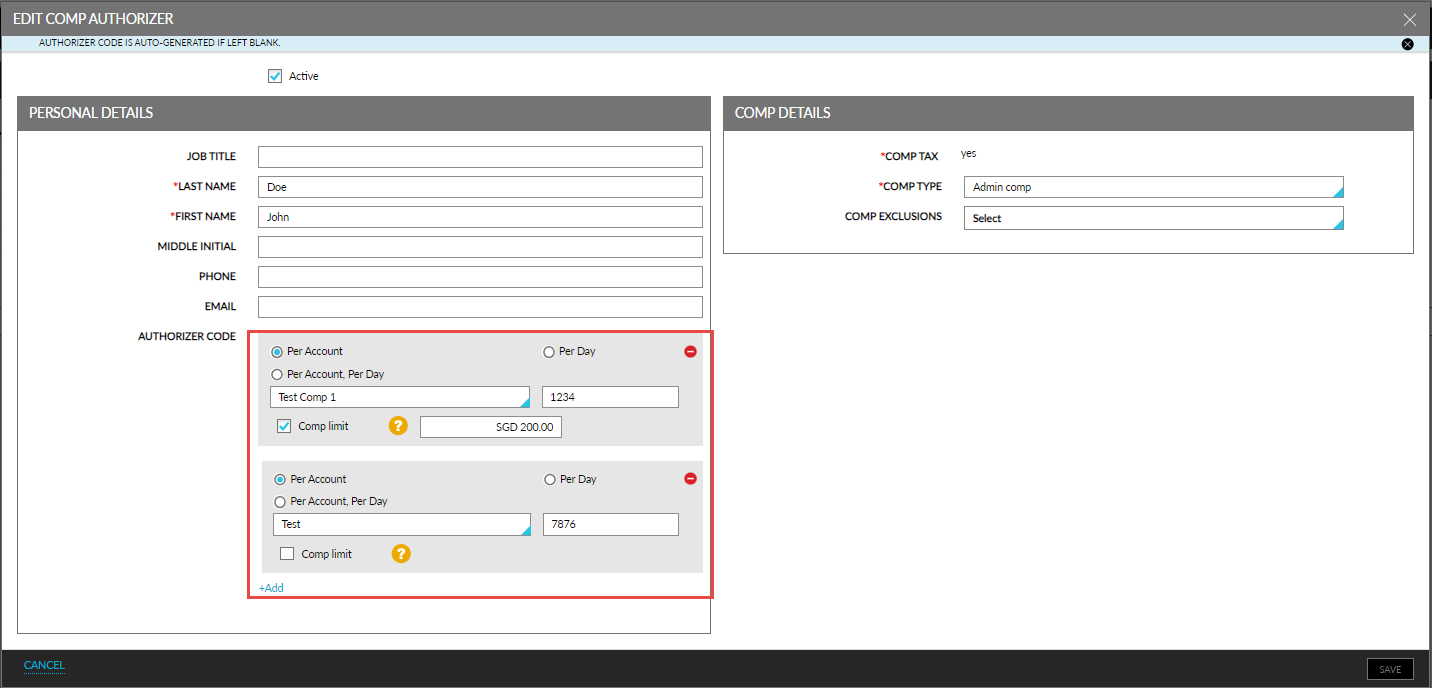
Multiple limits can be configured for the authorizer using the +Add hyperlink but for different departments and a unique authorizer code.
Configuring Limits in the Comp Departments Tab
Users can configure limits for comp authorizers in the Add/Edit Comp Department screen in the Comp Departments tab of the Comp Authorizers & Departments screen (All Settings ➜ Comp Accounting Configuration ➜ Comp Authorizers and Departments). Users can configure limits by selecting the preferred option in the Authorizers section, authorizer from the Select Authorizer drop-down list, and define the amount in the text box that appears when the Comp Limit checkbox is enabled.
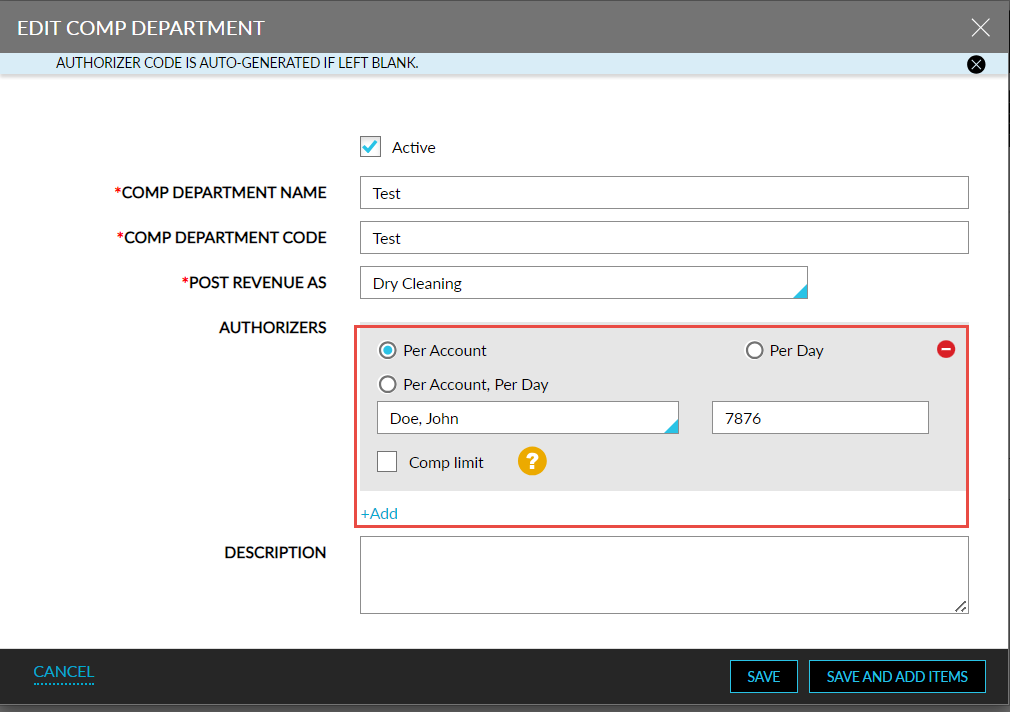
Users can associate multiple comp authorizers with a unique authorizer code to a department using the +Add hyperlink.
Configuring Limit Per Account
Users can define the maximum amount for which comps can be redeemed for a reservation by a comp authorizer using an authorizer code for a department by choosing the Per Account option and define the amount in the text box that appears when the Comp Limit checkbox is enabled in the mentioned screens.
For example, if users define the Comp Limit for an authorizer as $500, a maximum of $500 can be redeemed for a reservation by the authorizer for the entire duration of stay. Unused balance from the previous night of stay can be carried forward to the succeeding day, that is, if users redeem $300 on the first night of stay, the unused balance of $200 can be redeemed on the remaining nights of stay.
Configuring Limit Per Day
Users can define the maximum amount for which comps can be redeemed for reservations per day by a comp authorizer using an authorizer code for a department by choosing the Per Day option and define the amount in the text box that appears when the Comp Limit checkbox is enabled in the mentioned screens.
For example, if users define the Comp Limit for an authorizer as $500, a maximum of $500 can be redeemed for the day across multiple reservations. This amount can be redeemed for a single reservation or multiple reservations, that is, if $500 is redeemed for one reservation entirely, the authorizer cannot redeem any more comps for the day. On the other hand, if $200 was redeemed for one reservation, the unused balance of $300 can redeemed for the other reservations. The unused balance cannot be carried forward to the next day.
Configuring Limit Per Account Per Day
Users can define the maximum amount for which comp can be redeemed for a reservation for a day by a comp authorizer using an authorizer code for a department by choosing the Per Account Per Day option and define the amount in the text box that appears when the Comp Limit checkbox is enabled in the mentioned screens.
For example, if users define the Comp Limit for an authorizer as $500, a maximum of $500 can be redeemed for a reservation for a day. The unused balance cannot be carried forward to the remaining stay days, that is, if $200 is redeemed on the first night of stay by the authorizer, the unused balance of $300 cannot be carried forward to the remaining stay days.
When an authorizer redeems comps for a reservation for which the Comp Limit is configured, the following message is displayed when the limit is exceeded: Authorizer Does Not Have Sufficient Balance to Redeem Items.
To support this enhancement, the following changes have been made:
-
The following options have been added to the Authorizer Code field in the Add/Edit Comp Authorizer pop-up screen that allows users to define a limit for the maximum amount that can be redeemed using the authorizer.
-
Per Account
-
Per Day
-
Per Account Per Day
-
-
The field, Limit max amount per reservation, in the Add/Edit Comp Authorizer pop-up screen has been renamed to Comp Limit.